AI voice agents for customer service.
Give customers a way to ask, explain, and get an answer. Build responsive voice support with Cartesia, connected to the information and tools your team already uses.
Call a sample support line
Voice AI for support teams and contact centers
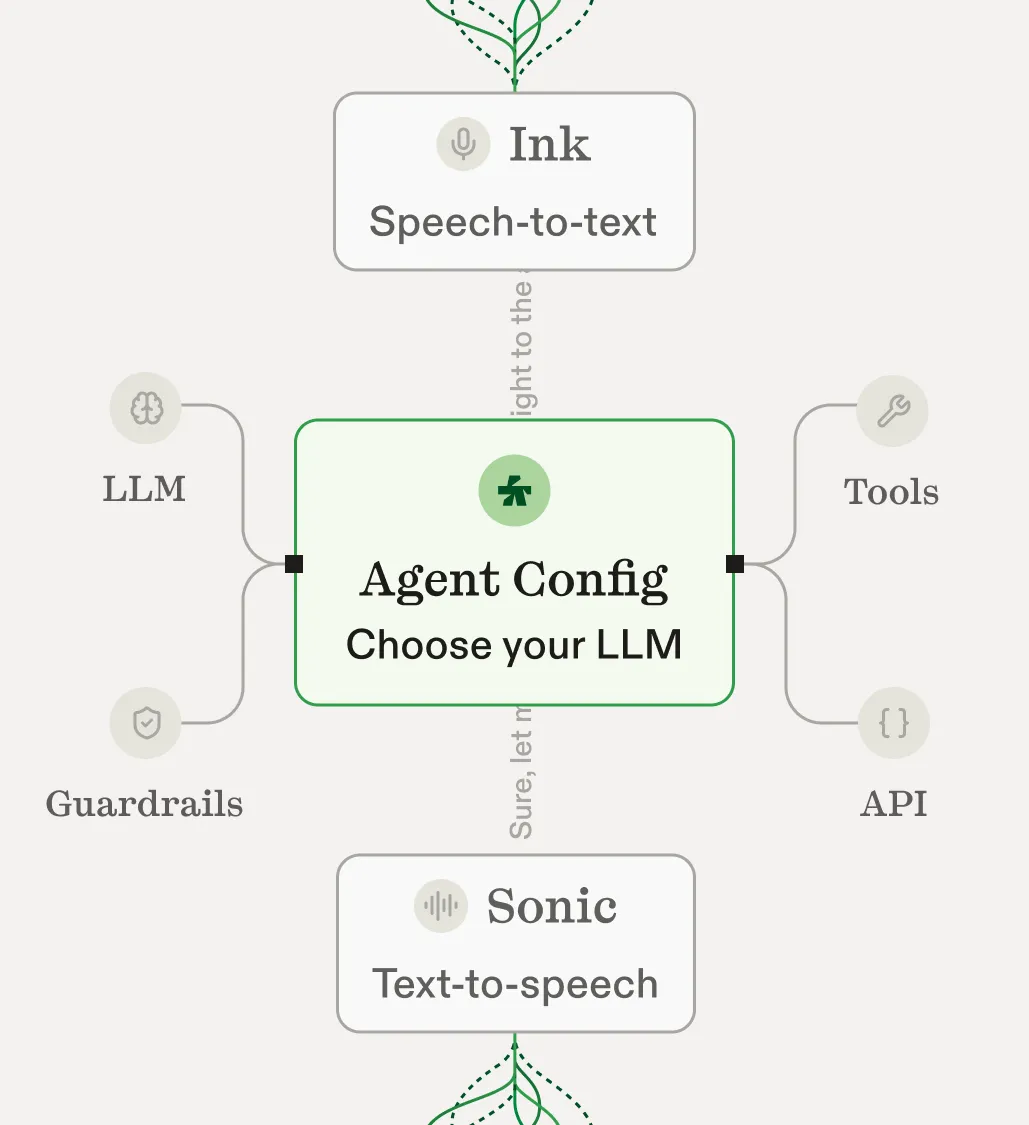
A customer-service voice agent combines speech recognition, conversation logic, and speech generation. Cartesia provides Ink, Sonic, and Managed Agents; your support systems supply the account details and actions behind each answer.
Product and technical support
Connect approved troubleshooting guides and product documentation so callers can explain a problem in their own words. Define when the agent should ask a clarifying question, create a ticket, or offer a human handoff.
Account and customer operations
Use authenticated account information for request status, onboarding questions, and scheduled callbacks. Keep billing changes and other account actions behind the permissions and confirmation steps in your support application.
Customer support voice agent workflows
Help callers troubleshoot a product, finish setup, or get an update on a support request. Connect the helpdesk information and escalation path each task needs.
Product questions and troubleshooting
Help callers with product questions, account information, and troubleshooting. Connect approved support content so answers reflect your business.
Customer onboarding and setup
Guide new customers through setup and check in when they need help. Give each conversation a defined next step.
Support callbacks and request updates
Call back with an update, confirm details, or arrange a time with your team. Your application controls when and why an agent reaches out.
Support-agent testing and training
Use representative conversations to test your instructions and tools. Review how the agent handles interruptions and requests outside its scope.
Build a support agent around your helpdesk.
Give the agent your support instructions, connect ticket status and approved answers, and define when to transfer a caller to your team.
Instructions
Help callers resolve questions about their account. Use the approved support information. Ask one question at a time, and offer a handoff when the request needs a person.
Speech to text
Ink
Text to speech
Sonic
Connected tools
- get_request_status
- create_support_ticket
- transfer_to_support
Illustrative conversation
Connect voice to your support stack.
Add Sonic and Ink to your current voice application, or build on Managed Agents. Connect your helpdesk and account systems through the tools you configure. Keep customer access scoped to the request.
Evaluate customer-service automation on real requests
Start with a narrow queue, such as product setup or request-status calls. Compare the agent with the workflow your team uses today before adding more types of support.
Explore Managed Agents and evaluation tools- Resolution: did the caller complete the task, or need to contact support again?
- Answer quality: did the response match the current knowledge base and account information?
- Handoffs: did the right team receive the call and the information needed to continue?
Trusted by leading enterprises. Speaking from experience.
Discover success stories“We didn’t switch to Sonic because it was incrementally better, we switched because nothing else came close… we’ve seen a 2.9% lift in our conversion and a 12.2% increase in customer engagement.”
Akshay Ramaswamy
Staff Product Manager
Enterprise-grade security.From Cloud to Local.

HIPAA compliant

SOC 2 Type 2

GDPR
Customer service voice AI FAQs
Can Cartesia work with our existing support stack?
Use the speech APIs in an existing voice application, or connect your systems to a Managed Agent. Helpdesk and account integrations depend on the tools and APIs you configure.
Can an agent hand a caller over to a person?
Define the circumstances that need a person and configure the transfer path in your implementation. Test both the conversation and the telephony handoff before launch.
How should we measure a support agent?
Start with a specific workflow. Review whether callers completed it, whether answers matched approved information, and when a person had to step in. Track these alongside call quality and latency.
Can we support multiple languages?
Check Sonic and Ink language coverage for your chosen models. Test the names, numbers, and support terminology your callers use in each language.
How is a voice agent different from an IVR menu?
An IVR commonly routes callers through fixed menu choices. A voice agent can interpret a spoken request and respond conversationally. It still needs explicit business rules and connected tools to retrieve information or complete an action.
Should we use Managed Agents or the speech APIs?
Use Managed Agents to configure a voice conversation with tools and a managed runtime. Use Sonic and Ink APIs when you already run an agent or want to own the conversation orchestration. The right choice depends on your existing platform and engineering requirements.
How does the agent get answers from our support content?
Prepare a maintained source of approved product and policy information, then connect it through the knowledge or retrieval tools your agent uses. Test conflicting documents, outdated answers, and questions the content does not cover.
Can an agent process refunds or change an account?
Those actions require tools connected to your systems. Your implementation decides which actions are allowed, how callers authenticate, and when confirmation or staff approval is required. Speech generation alone does not authorize an account change.
More ways to build with Cartesia
Get started today
Talk to an expert.
Connect with a member of our team and learn how Cartesia can help you build world-class voice experiences.
Start building.
Access our models via API and bring a voice agent into production in minutes.